AI Generated Images
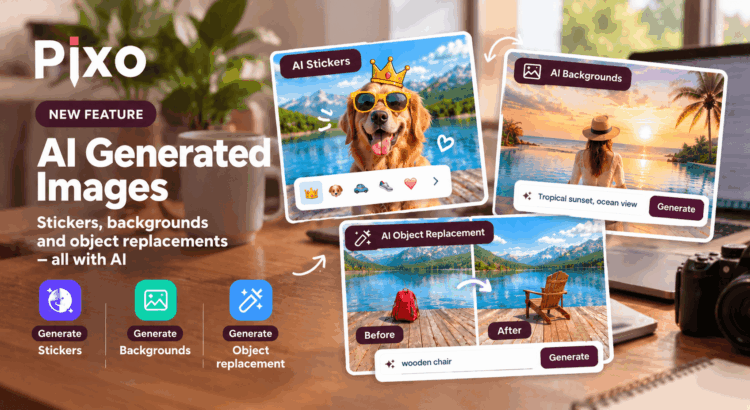
We’re happy to announce another major addition to Pixo – AI Generated Images!
Until now, Pixo already offered several AI-powered image editing tools: background removal and replacement, AI image upscaling, and the recently introduced AI Eraser. Now, we’re taking things a step further by allowing users to generate entirely new image content using a simple text prompt.
And this isn’t limited to generating standalone images. AI-generated content can be inserted directly into an image being edited, used as a new background, or even used to replace objects removed with the AI Eraser.
Let’s take a closer look!
Generate AI stickers
The first new feature allows users to generate and insert AI stickers directly into their images. This option is selected by default when opening the image generation tool.
And by stickers, we don’t mean just the familiar emojis and cartoon illustrations. Users can generate all sorts of visual content, including:
- Emojis and illustrations – create fun graphics to decorate images.
- Realistic photographs – generate realistic objects, people, and other photographic content.
- Sketches and drawings – create hand-drawn-style images and other artistic elements.
All it takes is a text prompt describing what the user wants to create. AI generates the image, and the user can insert it directly into the current image.
This opens up plenty of possibilities for applications where users need to personalize their photos, create unique designs, or add visual elements that aren’t available in a predefined sticker library.
Generate replacement backgrounds
We’ve had AI-powered background removal and replacement for quite some time. With this update, users can now generate a completely new background simply by describing it in text.
The new option is available in the Replacement background removal workflow and is selected by default.
Instead of choosing an existing image as the replacement background, users can describe the scene they want, and AI will generate a suitable background.
Want to place a product in a modern studio? Put a portrait on a tropical beach? Or create a completely different atmosphere for a photo? Just describe the desired result.
Combined with Pixo’s existing background removal capabilities, this makes it possible to transform the setting of an image without having to search for a suitable background image elsewhere.
Replace removed objects with AI-generated content
Remember our recently introduced AI Eraser? It allows users to mark unwanted objects and remove them, with AI reconstructing the background behind them.
Now, we can take this one step further.
After removing an object with AI Eraser, users can generate new content to fill its place. Instead of simply reconstructing the original background, AI can create a replacement based on a text prompt.
For example, users can remove an object from a photo and replace it with something else, or introduce a new element that wasn’t present in the original image.
This combines two powerful capabilities – object removal and AI image generation – into a single editing workflow.
A complete set of AI image editing tools
With this release, Pixo now brings together a comprehensive set of AI-powered image editing capabilities.
Here’s what users can do:
- Background removal and replacement – remove image backgrounds, use existing replacement images, or generate new backgrounds with AI. Read more about the Background tool.
- AI image upscaling – enlarge images while using AI to improve the result. Learn more about AI image upscaling.
- AI Eraser – remove unwanted objects and reconstruct the background behind them.
- AI sticker generation – generate emojis, realistic photographs, sketches, and other visual elements from text prompts.
- AI object replacement – remove an object and generate new content to replace it.
Each tool addresses a different image editing task, but they all work toward the same goal: making powerful image editing accessible without requiring users to master complex editing software.
And because Pixo is designed to be embedded into third-party websites and applications, developers can bring these capabilities directly into their own products without having to build an image editor from scratch.
What’s next?
This is a major milestone for Pixo. With AI-generated stickers, backgrounds, and object replacements joining our existing AI tools, Pixo now has a complete set of AI image editing features covering background manipulation, image enhancement, object removal, and content generation.
We’re excited to see how developers use these capabilities to build new experiences for their users.
Stay tuned for more updates!
